IT

宅内LAN下半分

本日午後、29日のBBIQ引き込みで明らかになったNTTのアナログ3回線を無事撤去。無料だった。

続いて、1日の着手早々にっちもさっちも行かなくなった宅内LANの1F側。ようやく工務店と電気工事の担当者から話を聞いたところ、なんと電話線は床下からぐるりと一周する形で反対側の壁を経て天井経由で降りてきている格好らしい。

てっきり2Fから天井伝いに降りてきているのを移設するだけで良いと思っていたのだが、そりゃどう引っ張っても抜けるわけがないし、抜けたところでどうしようもないじゃんか…orz

さて、1Fに単体でBSが観れないTV端子が存在していたのだが、予想通り一端子電通タイプの分配器を入れられていた事が判明。

もう一度天井を剥いで分配器を全端子電通タイプに交換する、という提案もあったが、ユニットバスの天井裏でLNB電源供給機をアンテナと中央分配器の間に挟んで常時電源供給させる事で決着。

これで一昨日書いた、PT2単独での地デジ問題も解消。慌ててマスプロ WPD6を調達しなくて良かったよ。

参照

BBIQ http://www.bbiq.jp/

LAN工事ドットコム http://lan-kouji.com/

集合住宅に光ファイバを http://www.gxk.jp/net/

PocketWifi通信状況

昨年10月に買った、イー・モバイルPocket WiFi (D25HW)の通信実績まとめ。

利用年月 パケット数 料金
2010年10月
—
2010年11月
—
2010年12月
—
2011年 1月
—
2011年 2月
—
2011年 3月
—
2011年 4月
—

1月以降はバリューデータプランに変更したのだが、2段階定額の低い天井2,457,600パケットにも全然届いてないね。

参照

イー・モバイル http://emobile.jp/

ホームLAN

情報コンセント予定地

情報コンセント予定地

29日にBBIQの光ファイバー引き込み工事が済んでひとまず開通。

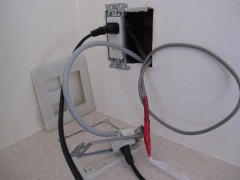
2Fリビングから無線LANルータ経由でのインターネットアクセスは問題無いのだが、1Fの自分の部屋までLANを引こうとしていてこれが難航。

工務店に頼んで部屋の中で既設のモジュラーを移しておいてもらい、電話線を引き抜くついでにCAT6ケーブルを引き込もうと思ったのだが、この電話線がどうにも2Fから引き抜けない"困ったちゃん"な状況。

というわけで、連休明けまで待つしか無いかな…

参照

BBIQ http://www.bbiq.jp/

LAN工事ドットコム http://lan-kouji.com/

集合住宅に光ファイバを http://www.gxk.jp/net/

Amazon.co.jp http://www.amazon.co.jp/

さくらのVPS 6日目

24日に導入したPostfixだが、virtual配送エージェントでは拡張アドレス毎の転送制御ができないと判断し、local配送エージェントに変更。

アンチスパムは引っ越し後でいいかと思っていたのだが、100通/日以上溜まってしまったので取り敢えず粗めに半分でも弾いてもらえばいいかと思い、nkf,dovecot-antispam,spamassassin,spamassassin-rules-ja,procmailをinstall。

~/.forward

"|exec /usr/bin/procmail -f- || exit 75"

~/.procmailrc

PATH=/bin:/usr/bin:/usr/local/bin
MAILDIR=$HOME/Maildir/
LOGFILE=$MAILDIR/procmail.log
LOCKFILE=$HOME/.lockmail
FORMAIL=/usr/bin/formail
DEFAULT=$MAILDIR
:0fw
*!^X-Spam.*
| /usr/bin/spamc --max-size=1000000
:0
*^X-Spam-Status: Yes
$HOME/.Spam/
:0
*^X-Spam-Status: No
{
     :0 c
     !account@pdx.ne.jp
}

参照

VPS(仮想専用サーバ)のさくらインターネット http://vps.sakura.ad.jp/

さくらのVPS 4日目

21日、22日、24日に続いてメールサーバの調整。

/etc/postfix/main.cfを編集し、

## 拡張メールアドレスデリミタを'-'に変更
#recipient_delimiter = +
recipient_delimiter = -

拡張メールアドレスを使えるようになったのはいいのだが、.forwardによる転送でも宛先アカウントにメールアドレスの拡張部分が付与されてしまい、rejectされているような…

SMTP RelayがうまくいかないのはOP25Bと判明。残念ながら試用期間中はもれなく適用されるそうだ。引越し終わればキャンセルしようかと思っていたのだが、止む無く本契約に移行する事を決めて2ヶ月分の使用料をクレジットカードで決済。

参照

VPS(仮想専用サーバ)のさくらインターネット http://vps.sakura.ad.jp/

Postfixのぺーじ http://www.postfix-jp.info/

さくらのVPS 3日目

21日、22日に続いてメールサーバpostfixとdovecot-postfixのinstall。ちなみにpostfixがVersion 2.7.0-1で、dovecot-postfixはVersion 1:1.2.9-1ubuntu6となった。

$ apt-get install postfix dovecot-postfix
Reading package lists... Done
Building dependency tree
Reading state information... Done
The following extra packages will be installed:
  dovecot-common dovecot-imapd dovecot-pop3d libpq5
Suggested packages:
  procmail postfix-mysql postfix-pgsql postfix-ldap postfix-pcre sasl2-bin resolvconf postfix-cdb mail-reader
The following NEW packages will be installed:
  dovecot-common dovecot-imapd dovecot-pop3d dovecot-postfix libpq5 postfix
0 upgraded, 6 newly installed, 0 to remove and 0 not upgraded.
Need to get 9,371kB of archives.
After this operation, 19.0MB of additional disk space will be used.
Do you want to continue [Y/n]? y
Get:1 http://jp.archive.ubuntu.com/ubuntu/ lucid-updates/main libpq5 8.4.7-0ubuntu0.10.04 [86.2kB]
Get:2 http://jp.archive.ubuntu.com/ubuntu/ lucid-updates/main dovecot-common 1:1.2.9-1ubuntu6.3 [5,216kB]
Get:3 http://jp.archive.ubuntu.com/ubuntu/ lucid-updates/main dovecot-imapd 1:1.2.9-1ubuntu6.3 [1,165kB]
Get:4 http://jp.archive.ubuntu.com/ubuntu/ lucid-updates/main dovecot-pop3d 1:1.2.9-1ubuntu6.3 [1,064kB]
Get:5 http://jp.archive.ubuntu.com/ubuntu/ lucid-updates/main postfix 2.7.0-1ubuntu0.1 [1,321kB]
Get:6 http://jp.archive.ubuntu.com/ubuntu/ lucid-updates/main dovecot-postfix 1:1.2.9-1ubuntu6.3 [518kB]
Fetched 9,371kB in 5s (1,782kB/s)
Preconfiguring packages ...
Selecting previously deselected package libpq5.
(Reading database ... 43158 files and directories currently installed.)
Unpacking libpq5 (from .../libpq5_8.4.7-0ubuntu0.10.04_i386.deb) ...
Selecting previously deselected package dovecot-common.
Unpacking dovecot-common (from .../dovecot-common_1%3a1.2.9-1ubuntu6.3_i386.deb) ...
Selecting previously deselected package dovecot-imapd.
Unpacking dovecot-imapd (from .../dovecot-imapd_1%3a1.2.9-1ubuntu6.3_i386.deb) ...
Selecting previously deselected package dovecot-pop3d.
Unpacking dovecot-pop3d (from .../dovecot-pop3d_1%3a1.2.9-1ubuntu6.3_i386.deb) ...
Selecting previously deselected package postfix.
Unpacking postfix (from .../postfix_2.7.0-1ubuntu0.1_i386.deb) ...
Selecting previously deselected package dovecot-postfix.
Unpacking dovecot-postfix (from .../dovecot-postfix_1%3a1.2.9-1ubuntu6.3_all.deb) ...
Processing triggers for man-db ...
Processing triggers for ureadahead ...
Processing triggers for ufw ...
Setting up libpq5 (8.4.7-0ubuntu0.10.04) ...
Setting up dovecot-common (1:1.2.9-1ubuntu6.3) ...
Creating config file /etc/dovecot/dovecot.conf with new version
Creating config file /etc/dovecot/dovecot-ldap.conf with new version
Creating config file /etc/dovecot/dovecot-sql.conf with new version
adduser: Warning: The home directory `/usr/lib/dovecot' does not belong to the user you are currently creating.
Creating generic self-signed certificate:  /etc/ssl/certs/dovecot.pem
(replace with hand-crafted or authorized one if needed).
update-rc.d: warning: dovecot stop runlevel arguments (1) do not match LSB Default-Stop values (0 1 6)
 * Starting IMAP/POP3 mail server dovecot                                                                [ OK ]
Setting up dovecot-imapd (1:1.2.9-1ubuntu6.3) ...
 * Restarting IMAP/POP3 mail server dovecot
If you have trouble with authentication failures,
enable auth_debug setting. See http://wiki.dovecot.org/WhyDoesItNotWork
This message goes away after the first successful login.
                                                                                                         [ OK ]
Setting up dovecot-pop3d (1:1.2.9-1ubuntu6.3) ...
 * Restarting IMAP/POP3 mail server dovecot
If you have trouble with authentication failures,
enable auth_debug setting. See http://wiki.dovecot.org/WhyDoesItNotWork
This message goes away after the first successful login.
                                                                                                         [ OK ]
Setting up postfix (2.7.0-1ubuntu0.1) ...
Adding group `postfix' (GID 114) ...
Done.
Adding system user `postfix' (UID 106) ...
Adding new user `postfix' (UID 106) with group `postfix' ...
Not creating home directory `/var/spool/postfix'.
Creating /etc/postfix/dynamicmaps.cf
Adding tcp map entry to /etc/postfix/dynamicmaps.cf
Adding group `postdrop' (GID 115) ...
Done.
setting myhostname: mail.bravotouring.com
setting alias maps
setting alias database
changing /etc/mailname to mail.bravotouring.com
setting myorigin
setting destinations: mail.bravotouring.com, localhost
setting relayhost:
setting mynetworks: 127.0.0.0/8 [::ffff:127.0.0.0]/104 [::1]/128
setting mailbox_size_limit: 0
setting recipient_delimiter: +
setting inet_interfaces: all
/etc/aliases does not exist, creating it.
WARNING: /etc/aliases exists, but does not have a root alias.
Postfix is now set up with a default configuration.  If you need to make
changes, edit
/etc/postfix/main.cf (and others) as needed.  To view Postfix configuration
values, see postconf(1).
After modifying main.cf, be sure to run '/etc/init.d/postfix reload'.
Running newaliases
 * Stopping Postfix Mail Transport Agent postfix                                                         [ OK ]
 * Starting Postfix Mail Transport Agent postfix                                                         [ OK ]
Setting up dovecot-postfix (1:1.2.9-1ubuntu6.3) ...
Configuring postfix for dovecot-postfix integration: .................... done.
 * Restarting IMAP/POP3 mail server dovecot
If you have trouble with authentication failures,
enable auth_debug setting. See http://wiki.dovecot.org/WhyDoesItNotWork
This message goes away after the first successful login.
                                                                                                         [ OK ]
 * Stopping Postfix Mail Transport Agent postfix                                                         [ OK ]
 * Starting Postfix Mail Transport Agent postfix                                                         [ OK ]
Processing triggers for libc-bin ...
ldconfig deferred processing now taking place

まずは、バーチャルドメイン管理ユーザー(10000:10000)の"post"を追加。

さくらのVPS 2日目

昨日の続き。apache2とphp5のinstall。

yano@vps:~$ apt-get install apache2 php5-mysql php5-cli libapache2-mod-php5

に続いて、サイトの設定。default-siteを元に設定ファイル~yano/etc/apache2/www.bravotouring.comを作成し、default-siteはdisableに。

$ cd /etc/apache2/
$ sudo a2dissite default
Site default disabled.
Run '/etc/init.d/apache2 reload' to activate new configuration!
$ sudo a2enmod ssl
Enabling module ssl.
See /usr/share/doc/apache2.2-common/README.Debian.gz on how to configure SSL and create self-signed certificates.
Run '/etc/init.d/apache2 restart' to activate new configuration!
$ cd /etc/apache2/sites-available/
$ su -
# ln -s ~yano/etc/apache2/www.bravotouring.com /etc/apache2/sites-available/
# ln -s ~yano/etc/apache2/www.bravotouring.com-ssl /etc/apache2/sites-available/
# a2ensite www.bravotouring.com
Enabling site www.bravotouring.com.
Run '/etc/init.d/apache2 reload' to activate new configuration!
# a2ensite www.bravotouring.com-ssl
Enabling site www.bravotouring.com-ssl.
Run '/etc/init.d/apache2 reload' to activate new configuration!
# make-ssl-cert /usr/share/ssl-cert/ssleay.cnf ~yano/apache-ssl.crt
~~ WindowでCommonName(サイト名)の設定 ~~
# openssl x509 -in ~yano/apache-ssl.crt > /etc/ssl/certs/ssl-cert-www.bravotouring.com.pem
# openssl rsa -in ~yano/apache-ssl.crt > /etc/ssl/private/ssl-cert-www.bravotouring.com.key
# chmod 640 /etc/ssl/private/ssl-cert-www.bravotouring.com.key
# rm ~yano/apache-ssl.crt

続いてphp5関連でPCREの設定とUserDirの設定。

さくらのVPS 初日

まずはお約束の設定変更。

$ sudo /usr/sbin/groupmod -n owner yano
$ sudo update-alternatives --config editor

で、グループ名とデフォルトエディタを変更。

$ sudo visudo

sudoでいちいちパスワードを打たなくていいようvisudoでNOPASSWDオプションを付与しておく。

%admin ALL=(ALL) NOPASSWD: ALL
$ sudo vi /etc/ssh/sshd_config
$ sudo /etc/init.d/ssh restart

で、sshのポート番号を変更し、パスワード認証とrootログインを禁止。

続いてaptをアップデートし、ntpやbuild-essentialを導入し、ntpサーバをntp.jst.mfeed.ad.jpに変更。

$ sudo apt-get update
$ sudo apt-get install ntp build-essential
$ sudo vi /etc/ntp.conf
$ sudo /etc/init.d/ntp restart

それからnsdを導入。パッケージとしてはnsd3とnsdがあるが、積極的に旧版をチョイスするだけの根拠は持ち合わせて無いので、素直にnsd3を導入。

$ sudo apt-get install nsd3
Reading package lists... Done
Building dependency tree
Reading state information... Done
The following NEW packages will be installed:
  nsd3
0 upgraded, 1 newly installed, 0 to remove and 0 not upgraded.
Need to get 842kB of archives.
After this operation, 1,622kB of additional disk space will be used.
Get:1 http://jp.archive.ubuntu.com/ubuntu/ lucid/universe nsd3 3.2.4-1 [842kB]
Fetched 842kB in 0s (1,037kB/s)
Selecting previously deselected package nsd3.
(Reading database ... 42388 files and directories currently installed.)
Unpacking nsd3 (from .../archives/nsd3_3.2.4-1_i386.deb) ...
Processing triggers for man-db ...
Processing triggers for ureadahead ...
ureadahead will be reprofiled on next reboot
Setting up nsd3 (3.2.4-1) ...
dpkg-statoverrides: warning: --update given but /etc/nsd3/nsd.conf does not exist
**Could not open /etc/nsd3/nsd.conf: No such file or directory**
Could not open /etc/nsd3/nsd.conf: No such file or directory
 * Building nsd3 zones...
Could not open /etc/nsd3/nsd.conf: No such file or directory
**invoke-rc.d: initscript nsd3, action "start" failed.**
dpkg: error processing nsd3 (--configure):
 subprocess installed post-installation script returned error exit status 1
Errors were encountered while processing:
 nsd3
E: Sub-process /usr/bin/dpkg returned an error code (1)
$ sudo ls -la /etc/nsd3/
total 16
drwxr-x---  2 nsd  nsd  4096 2011-04-21 15:44 .
drwxr-xr-x 77 root root 4096 2011-04-21 15:44 ..
-rw-r--r--  1 root root 4406 2010-02-09 00:35 nsd.conf.sample

と、ひと通りのインストールは出来ているみたいだが~/etc/nsd3/nsd.confが無いという事で起動エラーが出る。ていうか、何も設定してないのに起動しちゃダメでしょう、というわけで/var/lib/dpkg/info/nsd3.postinstのサービス起動処理をコメントアウト
東北新幹線の被害

震災の影響で福島~盛岡で不通となっている東北新幹線。

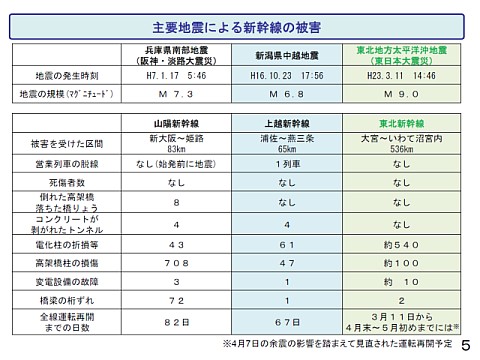
主要地震による新幹線の被害

第18回中央新幹線小委員会 配付資料より

先月11日の大地震による被害状況が国土交通省の交通政策審議会:中央新幹線小委員会で報告されている。

被災区間は大宮-いわて沼宮内間の536km。上越新幹線「とき325号」の10両中8両が脱線した2004年の新潟中越地震と比較して9~10倍の規模だが、営業運転中だった26本もの列車が一両も脱線せず無事に停止できたのは何よりだったね。

今回の震災では1200箇所を超える数の地上施設が被災したそうだが、高架橋や橋梁、トンネルなどの構造物については大きな損傷が無かった事から、阪神・淡路大震災後に見直された耐震基準に従った補強が為された東海道新幹線はもちろん、リニア中央新幹線についても追加的補強は不要との事。

という事は、九州新幹線も大丈夫という事かな。

『携帯インフラ復旧の現場から』も興味深いので読んでおきたい。

参照

日本経済新聞 http://www.itmedia.co.jp/news/ » モバイルの達人(石川温)

国土交通省 http://www.mlit.go.jp/ » 交通政策審議会:中央新幹線小委員会

YouTube http://www.youtube.com/