Samba

Stop using SMB1

5月末「Windows 10 Fall Creators Update」(Redstone3:1709)をクリーンインストールしたJ3455

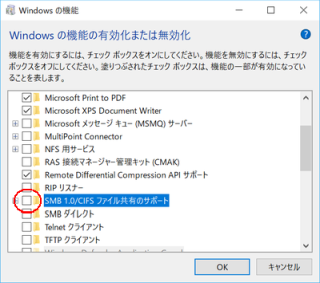
SMB 1.0/CIFS ファイル共有のサポート

「Windows の機能の有効化または無効化」より

ネットワークにReadyNAS以外のLANDISKLinkStationが見えなくなっていた問題だが、何と「Windows 10 Fall Creators Update」以降「SMB 1.0/CIFS」が**“無効”**になったらしい。

GT110bの方でマウントオプションをSMB 3.0対応させたのとは真逆の対応になるのだが、取り敢えず「Windowsの機能の有効化または無効化」で「SMB 1.0/CIFSファイル共有のサポート」にチェックを入れて再起動したところ、無事LANDISKLinkStationにも繋がるようになった。

背景にSMB 1.0のランサムウェア対策という事情があるようだが、LANDISKLinkStationはSMB 1.0しか対応してないのでやむを得ない。

参照

Cloud-Wrok.jp https://cloud-work.jp/

窓の杜 https://forest.watch.impress.co.jp/

Microsoft サポート https://support.microsoft.com/ja-jp/

Microsoft 日本のセキュリティチーム https://blogs.technet.microsoft.com/jpsecurity/

Storage at Microsoft https://ja.wikipedia.org/wiki/

Wikipedia https://ja.wikipedia.org/wiki/
SMB 3.0

Intel NUC DN2820FYKHへの記憶域プール移設障害はUSBハブで解消したものの、記憶域プールを共有設定してGT110bでmountしようとしたところ

yano@GT110b:~$ sudo mount.cifs  //NUC/Videos /mnt/NUC --verbose -o user=yano,pass='********'
mount.cifs kernel mount options: ip=192.168.199.12,unc=\\NUC\Videos,user=yano,pass=********
mount error(5): Input/output error
Refer to the mount.cifs(8) manual page (e.g. man mount.cifs)
yano@GT110b:~$

というエラー発生

Windows 8.1とWindows 10の違いなのかな…と思いつつ、「アカウント認証は通っている感じなのに、あとは何があかんの~?」と思いながら、ひと月以上悪戦苦闘していたのだが、

yano@GT110b:~$ sudo mount.cifs  //NUC/Videos /mnt/Intel-NUC --verbose -o user=yano,pass='********',vers=3.0
mount.cifs kernel mount options: ip=192.168.199.12,unc=\\NUC\Videos,vers=3.0,user=yano,pass=********
yano@GT110b:~$

と、versオプションを付与する事でようやく解決した。

自動マウントのケアは/etc/fstab

# //X200/Videos   /mnt/x200  cifs  credentials=/etc/smbpasswd.x200,iocharset=utf8,uid=yano,gid=family          0       0
//NUC/Videos      /mnt/NUC   cifs  credentials=`/etc/smbpasswd.x200`,vers=3.0,iocharset=utf8,uid=yano,gid=family 0       0

と書けばOKだ。

参照

@IT http://www.atmarkit.co.jp/

山市良のえぬなんとかわーるど https://yamanxworld.blogspot.com/

Wikipedia https://ja.wikipedia.org/wiki/

Xenial Xerus

6月に試したUbuntu 16.04 (Xenial Xerus)

Ubuntu 16.04 'Xenial Xerus' LTS

Ubuntu Maniacより

Hyper-Vではゲストとのファイル共有ができないので、sambaをインストールして「sudo service samba restart」とやったところ

yano@Xenial:~$ sudo service samba restart
Failed to restart samba.service: Unit samba.service is masked.

と怒られた。statusを診たら

yano@Xenial:~$ sudo service samba status
● samba.service
   Loaded: masked (/dev/null; bad)
   Active: inactive (dead)

と言われて、何が何やら。

結局、Ubuntu 16.04: sambaをインストールしてWindows 10とファイル共有するに倣って

sudo systemctl restart smbd nmbd

とする事でOKだったのだが、Ubuntu Wikiを調べてみたところ、SystemdForUpstartUsers

Switching init systems If you are running Ubuntu vivid (15.04), you can easily switch between upstart and systemd at will since both packages are installed at present. As of March 9 2015, vivid was changed to use systemd by default, before that upstart was the default.