tinytuyaとtuyapi
消費電力が確認できるGosundスマートプラグの続報。
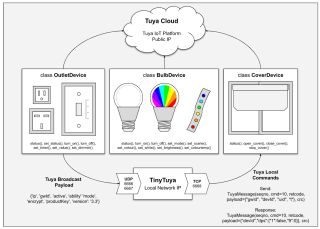
デバイスID'18261828c4dd57XXXXXX’とローカルキー'7e5f08badbYYYYYY’が取得できたので、クラウドではなくLAN経由に対応している(らしい)tinytuyaにトライ。
まずはpython3とtinytuyaをインストールし、"tinytuya scan"でスマートプラグのIPアドレスを調査。
yano@haswell:~$ sudo apt install python3 python3-pip
yano@haswell:~$ python3 -m pip install tinytuya
yano@haswell:~$ python3 -m tinytuya scan
TinyTuya (Tuya device scanner) [1.7.2]
Scanning on UDP ports 6666 and 6667 for devices (15 retries)...
Unknown v3.3 Device   Product ID = keyneruwsdethu7u  [Valid payload]:
    Address = 172.16.NN.MM,  Device ID = 1826182870039fXXXXXX, Local Key = ,  Version = 3.3, MAC =
    No Stats for 172.16.NN.MM: DEVICE KEY required to poll for status
Unknown v3.3 Device   Product ID = keyneruwsdethu7u  [Valid payload]:
    Address = 172.16.NN.MM,  Device ID = 18261828c4dd57XXXXXX, Local Key = ,  Version = 3.3, MAC =
    No Stats for 172.16.NN.MM: DEVICE KEY required to poll for status
Scan Complete!  Found 2 devices.
>> Saving device snapshot data to snapshot.json
yano@haswell:~$
"tuyapower"だとこんな感じ。
yano@haswell:~$ python3 -m pip install tuyapower
yano@haswell:~$ python3 -m tuyapower
TuyaPower (Tuya compatible smart plug scanner) [0.2.0] tinytuya [1.7.2]
Scanning on UDP ports 6666 and 6667 for devices (15 retries)...
FOUND Device [Valid payload]: 172.16.NN.MM
    ID = 1826182870039fXXXXXX, product = keyneruwsdethu7u, Version = 3.3
    Device Key required to poll for stats
FOUND Device [Valid payload]: 172.16.NN.MM
    ID = 18261828c4dd57XXXXXX, product = keyneruwsdethu7u, Version = 3.3
    Device Key required to poll for stats
Scan Complete!  Found 2 devices.
yano@haswell:~$
プラグが複数ある場合はデバイスIDで識別可能だ。
IPアドレス、デバイスID、ローカルキーを~/smarthome/tinytuya/tuya_power_tv.pyに書いて
#!/usr/bin/env python3
-- coding: utf-8 --
tuya_power.py as an example of using TinyTuya
import tinytuya import datetime import json import sys DPS_Current=‘18’ DPS_Power=‘19’ DPS_Voltage=‘20’ IpAddress=“172.16.NN.MM” DeviceId=“18261828c4dd57XXXXXX” LocalKey=“7e5f08badbYYYYYY” def get_plug_power(): d = tinytuya.OutletDevice(DeviceId, IpAddress, LocalKey) d.set_version(3.3) dt_now = datetime.datetime.now() data = d.status() dps = data[‘dps’] val_amp = dps[DPS_Current] / 1000 val_watt = dps[DPS_Power] / 10 val_volt = dps[DPS_Voltage] / 10 print(dt_now, val_amp, val_watt, val_volt) try: get_plug_power() except KeyboardInterrupt: sys.exit(0)
を叩くと、
yano@haswell:~$ ~/smarthome/tinytuya/tuya_power.py
2022-06-29 00:00:44.129984 0.122 7.2 101.8
yano@haswell:~$
と消費電力値が取得できた。
参照
ファームロジックス https://flogics.com/
- スマートテーブルタップを Python から制御する 2022年2月2日
Qiita https://qiita.com/
- 新版・中華製スマートプラグを node で制御する 2020年5月14日
- pythonでsmartlife電源を操作 (脱IFTTT) 2021年8月8日
- 中華製スマートプラグ をAPIで操作する。(tuya-cli利用の代替案) 2021年1月23日
Tuya Smart Developer Center https://iot.tuya.com/
GitHub https://github.com/
- codetheweb/tuyapi: 🌧 An easy-to-use API for devices that use Tuya’s cloud services.
- jasonacox/tinytuya: Python API for Tuya WiFi smart devices using a direct local area network (LAN) connection or the cloud (TuyaCloud API).
Google Play のアプリ https://play.google.com/store/apps/
Wikipedia https://en.wikipedia.org/wiki/