QSV

VAAPIとffmpeg

1月に続いてASRock H97 Pro4にXeon E3-1265L v3を載せたHaswellでのQSVなハードウェアエンコードの続き。

参照

P-Life http://mypedia.info/

水珈琲の日誌 https://www.mizucoffee.com/

FFmpeg https://ffmpeg.org/

Wikipedia https://en.wikipedia.org/wiki/

VAAPIとffmpeg

昨年12月に続いてASRock H97 Pro4にXeon E3-1265L v3を載せたHaswellでのQSVなハードウェアエンコードの続き。

h264_vaapiffmpegの準備。2017年に倣ってbuildしないとなぁ…と思ってたんだけれども、

ffmpeg version 4.3.1 Copyright (c) 2000-2020 the FFmpeg developers
  built with gcc 9 (Ubuntu 9.3.0-17ubuntu1~20.04)
  configuration: --extra-libs='-lpthread -lm' --enable-libmfx --enable-gpl --enable-libaom --enable-libass --enable-libfdk-aac --enable-libfreetype --enable-libmp3lame --enable-libopus --enable-libvorbis --enable-libx264 --enable-libx265 --enable-nonfree
  libavutil      56. 51.100 / 56. 51.100
  libavcodec     58. 91.100 / 58. 91.100
  libavformat    58. 45.100 / 58. 45.100
  libavdevice    58. 10.100 / 58. 10.100
  libavfilter     7. 85.100 /  7. 85.100
  libswscale      5.  7.100 /  5.  7.100
  libswresample   3.  7.100 /  3.  7.100
  libpostproc    55.  7.100 / 55.  7.100
Hyper fast Audio and Video encoder
usage: ffmpeg [options] [[infile options] -i infile]... {[outfile options] outfile}...
Use -h to get full help or, even better, run 'man ffmpeg'
root@haswell:~# ffmpeg -encoders 2>/dev/null | grep vaapi
 V..... h264_vaapi           H.264/AVC (VAAPI) (codec h264)
 V..... hevc_vaapi           H.265/HEVC (VAAPI) (codec hevc)
 V..... mjpeg_vaapi          MJPEG (VAAPI) (codec mjpeg)
 V..... mpeg2_vaapi          MPEG-2 (VAAPI) (codec mpeg2video)
 V..... vp8_vaapi            VP8 (VAAPI) (codec vp8)
 V..... vp9_vaapi            VP9 (VAAPI) (codec vp9)
root@haswell:~#

aptで導入されたffmpegでもVAAPI対応しているみたいだ。

VAAPI

ASRock H97 Pro4にXeon E3-1265L v3を載せたHaswellでQSVなハードウェアエンコードをお試し。

2017年に通った道だが、まずは最新版のUbuntu 20.04(FocalFossa) Serverを導入。

続いて「Intel® Media SDK」を入れればいいのかぁな…と思ったのだが、2013年生まれのHaswellは古すぎるので、Video Acceleration API(VAAPI)を使えということらしい。

root@haswell:~# apt install -y build-essential libva2 vainfo i965-va-driver

で導入し、

root@haswell:~# vainfo
error: XDG_RUNTIME_DIR not set in the environment.
error: can't connect to X server!
libva info: VA-API version 1.7.0
libva info: Trying to open /usr/lib/x86_64-linux-gnu/dri/iHD_drv_video.so
libva info: va_openDriver() returns -1
libva info: Trying to open /usr/lib/x86_64-linux-gnu/dri/i965_drv_video.so
libva info: Found init function __vaDriverInit_1_6
libva info: va_openDriver() returns 0
vainfo: VA-API version: 1.7 (libva 2.6.0)
vainfo: Driver version: Intel i965 driver for Intel(R) Haswell Server - 2.4.0
vainfo: Supported profile and entrypoints
      VAProfileMPEG2Simple            : VAEntrypointVLD
      VAProfileMPEG2Simple            : VAEntrypointEncSlice
      VAProfileMPEG2Main              : VAEntrypointVLD
      VAProfileMPEG2Main              : VAEntrypointEncSlice
      VAProfileH264ConstrainedBaseline: VAEntrypointVLD
      VAProfileH264ConstrainedBaseline: VAEntrypointEncSlice
      VAProfileH264Main               : VAEntrypointVLD
      VAProfileH264Main               : VAEntrypointEncSlice
      VAProfileH264High               : VAEntrypointVLD
      VAProfileH264High               : VAEntrypointEncSlice
      VAProfileH264MultiviewHigh      : VAEntrypointVLD
      VAProfileH264MultiviewHigh      : VAEntrypointEncSlice
      VAProfileH264StereoHigh         : VAEntrypointVLD
      VAProfileH264StereoHigh         : VAEntrypointEncSlice
      VAProfileVC1Simple              : VAEntrypointVLD
      VAProfileVC1Main                : VAEntrypointVLD
      VAProfileVC1Advanced            : VAEntrypointVLD
      VAProfileNone                   : VAEntrypointVideoProc
      VAProfileJPEGBaseline           : VAEntrypointVLD
root@haswell:~# ll /dev/dri/
total 0
drwxr-xr-x   3 root root        100 Dec 09 16:43 ./
drwxr-xr-x  19 root root       4380 Dec 09 09:45 ../
drwxr-xr-x   2 root root         80 Dec 09 16:43 by-path/
crw-rw----+  1 root video  226,   0 Dec 09 16:43 card0
crw-rw----+  1 root render 226, 128 Dec 09 16:43 renderD128
root@haswell:~#

となればVideo Acceleration API(VAAPI)の準備OK。

Fire TV Stick 4K

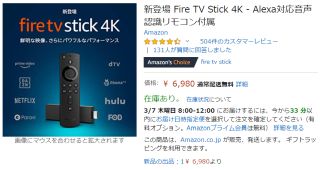
先日Fire TV Stick 4K

Amazon Fire TV Stick 4K

Amazon Fire TV Stick 4Kより

一部のファイル再生でアプリが固まる問題だが、どうやらTMPGEnc Video Mastering WorksでNVENCかQSVのハードウェアエンコードを使ったファイルについて高確率(ほぼ100%)で発生する事が判明。

取り敢えずUbuntuでのNVENCエンコードについては問題無いのが救いで、問題のファイルでも「Amazon Fire TV Stick 4K」側の再生時ハードウェアデコードを無効化すれば「アプリが固まる」事は無いのだが、それはそれで問題がなんなのかよくわからない。

結局のところ、TMPGEnc Video Mastering Worksではx264一択という事になるので、既存のMP4ファイルもエンコードし直せばいいのだが、どれが件のハードウェアエンコードだったかわからないのがやっかいだ。

参照

Amazon開発者ポータル https://developer.amazon.com/ja/apps-and-games

Amazon.co.jp https://www.amazon.co.jp/

Wikipedia https://ja.wikipedia.org/wiki/

H77M-ITXデュアルGPU構成

WQHDモニタ328P6AUBREB/11の導入の流れでtsubameGEFORCE GTX 750 Ti OC Slim 2GBを載せた結果、Ivy BridgeXeon E3-1225 v2(8M Cache, 3.20 GHz)Intel Quick Sync Video塩漬け状態に。

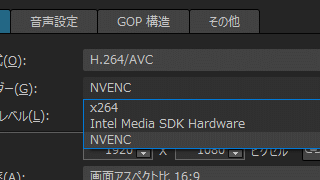
NVENCもIntel Media SDK Hardwareも選択可能!

TMPGEnc Video Mastering Works 6より

せっかくMPEG2のHWエンコードができるようになったのに残念だな…と思いつつ、以前もグラフィックボードを差した状態でCPU内蔵GPUのQSVが使えないかと試みたものの、廉価版のH77チップセットではどちらか一方だけという事だったので諦めていたのだがH77M-ITXにRadeon HD 7750導入。さらにQSVエンコードも併用しちゃう!とかいう話を見つけたので、また試してみた。

まずはH77M-ITXのBIOSを最新の1.90に上げたあと、UEFI設定の"Advanced"→**“IGPU Multi-Monitor”**を「Enabled」にして、オンボードのHDMIにもDELL U2410を接続して起動したところ、すんなりデュアルモニタ構成で立ち上がった。

**“Primary Graphics Adapter”**を「PCI-Express」に設定したのは何となく無視されているような気がするが、

インテル® HD グラフィックス・ドライバーの最新版(15.33.46.4885)をインストールし直しして、TMPGEnc Video Mastering Works 6を起動したところ、無事に「NVENC」も「Intel Media SDK Hardware」も選択可能となった。肝心な「MPEG2のQSVエンコード」もOKだ。

一旦動いてしまえば、オンボードのHDMI接続を外してGTX 750 Ti単独にしても大丈夫そう。やった~。

参照

駄文置場 http://qeynos2525.blog.jp/

USBメモリー収集家のブログ https://ameblo.jp/iso5210/

Sakopc blog http://sakopc.myqnapcloud.com/

Mirillis https://mirillis.com/

日経 xTECH(クロステック) http://tech.nikkeibp.co.jp/

GstreamerとVAAPI

18日からトライしているGStreamerのVAAPIエンコード環境整備。

/srcからソースコードをダウンロードし、gstreamer-1.10.2gstreamer-vaapi-1.10.2をbuildしてみたものの、

yano@haswell:~/gstreamer/gstreamer-vaapi-1.10.2$ gst-inspect-1.0 vaapi
Plugin Details:
  Name                     vaapi
  Description              VA-API based elements
  Filename                 /usr/local/lib/gstreamer-1.0/libgstvaapi.so
  Version                  1.10.2
  License                  LGPL
  Source module            gstreamer-vaapi
  Source release date      2016-11-29
  Binary package           gstreamer-vaapi
  Origin URL               http://bugzilla.gnome.org/enter_bug.cgi?product=GStreamer
  **0 features**:
  +-- **0 elements**
yano@haswell:~/gstreamer/gstreamer-vaapi-1.10.2$

と、なかなかVAAPIのフィルタが有効にならない。他にもいろいろと足りないものがあったので、gst-plugins-base-1.10.2gst-plugins-bad-1.10.2gst-plugins-good-1.10.2gst-plugins-ugly-1.10.2vo-aacenc-0.1.3libmpeg2-0.5.1gst-libav-1.10.2libva-1.7.3libva-intel-driver-1.7.3をbuildしていくもののダメで、結局のところ

yano@haswell:~$ sudo apt-get install libdrm-dev libudev-dev libva-dev

が効いたようで、ようやく

yano@haswell:~/gstreamer/gstreamer-vaapi-1.10.2$ gst-inspect-1.0 vaapi
Plugin Details:
  Name                     vaapi
  Description              VA-API based elements
  Filename                 /usr/local/lib/gstreamer-1.0/libgstvaapi.so
  Version                  1.10.2
  License                  LGPL
  Source module            gstreamer-vaapi
  Source release date      2016-11-29
  Binary package           gstreamer-vaapi
  Origin URL               http://bugzilla.gnome.org/enter_bug.cgi?product=GStreamer
  vaapijpegdec: VA-API JPEG decoder
  vaapimpeg2dec: VA-API MPEG2 decoder
  vaapih264dec: VA-API H264 decoder
  vaapivc1dec: VA-API VC1 decoder
  vaapipostproc: VA-API video postprocessing
  vaapidecodebin: VA-API Decode Bin
  vaapisink: VA-API sink
  vaapimpeg2enc: VA-API MPEG-2 encoder
  vaapih264enc: VA-API H264 encoder
  9 features:
  +-- 9 elements
yano@haswell:~/gstreamer/gstreamer-vaapi-1.10.2$

となった。
GstreamerとVAAPI

宿題を残したQSVハードウェアエンコード環境。

Intel VAAPI h264 encoding: gstreamer vs ffmpeg\avconvなどによるとVAAPI対応の選択肢としてGStreamerもあるようなので、試してみた。

yano@haswell:~/gst-test$ sudo apt-get install gstreamer1.0-vaapi*
yano@haswell:~/gst-test$ gst-inspect-1.0 vaapi
Plugin Details:
  Name                     vaapi
  Description              VA-API based elements
  Filename                 /usr/lib/x86_64-linux-gnu/gstreamer-1.0/libgstvaapi.so
  Version                  0.5.7
  License                  LGPL
  Source module            gstreamer-vaapi
  Binary package           gstreamer-vaapi
  Origin URL               gwenole.beauchesne@intel.com
  vaapidecode: VA-API decoder
  vaapipostproc: VA-API video postprocessing
  vaapisink: VA-API sink
  3 features:
  +-- 3 elements
yano@haswell:~/gst-test$

との事。GStreamer VA-API Plugins 1.0 Plugins Reference Manualを見る限り「VA-API based H.264 video encoder」がありそうなのだが、どうやらubuntu 14.04の公式パッケージはデコーダ未対応の旧版な雰囲気だ。

というわけで、必然的に最新版をソースコードからbuildする方向にハンドルを切るわけだが、その前にGstreamerの独特な作法に馴染むべく、取り敢えずx264で試行錯誤してmp4のファイル出力にトライ。

yano@haswell:~/gst-test$ ffmpeg -i ~/20161210_2313_28_GRhd.ts -map 0:0 -map 0:1 \
  -vcodec copy -acodec copy ./input.ts
yano@haswell:~/gst-test$ gst-launch-1.0 \
  filesrc location=./input.ts ! progressreport ! tsdemux name=demuxer demuxer. ! queue ! \
  aacparse ! avdec_aac ! audioresample ! audioconvert dithering=0 ! voaacenc bitrate=25800 ! mux. \
  mp4mux name=mux ! filesink location=./gst-x264-`date +%Y%m%d_%H%M`.mp4 demuxer. ! queue ! mpegvideoparse ! mpeg2dec ! \
  videoconvert ! x264enc pass=quant ! video/x-h264,stream-format=byte-stream,profile=high ! h264parse ! mux.
Got EOS from element "pipeline0".
Setting pipeline to PAUSED ...
Pipeline is PREROLLING ...
Redistribute latency...
Pipeline is PREROLLED ...
Setting pipeline to PLAYING ...
New clock: GstSystemClock
progressreport0 (00:00:05): 4869200 / 250449088 bytes ( 1.9 %)
progressreport0 (00:00:10): 8648000 / 250449088 bytes ( 3.5 %)
~中略~
progressreport0 (00:04:15): 241937200 / 250449088 bytes (96.6 %)
progressreport0 (00:04:20): 246054400 / 250449088 bytes (98.2 %)
Execution ended after 0:04:27.257661620
Setting pipeline to PAUSED ...
Setting pipeline to READY ...
Setting pipeline to NULL ...
Freeing pipeline ...
yano@haswell:~/gst-test$

ちなみに生のTSをそのまま喰わせると

UbuntuとQSV

昨日構築したQSVハードウェアエンコード環境。

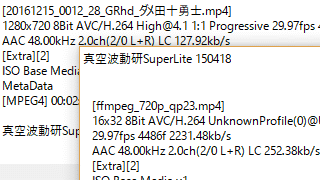
16x32 8bit AVC/H.264って

真空波動研SuperLite 150418より

mp4/720pのエンコードが200fpsを超え、x264ソフトウェアと比較して10分の1以下という強烈な時短効果が得られる結果に満足。

同ファイルサイズ(≒ビットレート)での画質を考えるとx264には遠く及ばないものの、TVのオンエアを録画する観点では充分な印象だ。

ただ気になっているのが、エクスプローラーでの詳細情報で時間などが表示されないこと。

「真空波動研SuperLite」でもちょっとおかしなプロファイル表示になるので、宿題としておきたい。

参照

Qiita http://qiita.com/

大ちゃんのいろいろ雑記 https://www.taruki.com/

Web Net Force http://webnetforce.net/

hirooka.pro https://hirooka.pro/

Kung Noi Blog http://www.goodnai.com/

rigayaの日記兼メモ帳 http://rigaya34589.blog135.fc2.com/

UbuntuとQSV

H97 Pro4は修理に出して、再びUbuntuでのハードウェアエンコード環境構築に着手。

2015年9月にIntel® Media Server StudioのCommunity Editionが無償公開されたので、予てよりこそこそとトライしていたのだが、対応するCPU世代がHaswell以降に限定されてたり、カーネルのカスタマイズ(rebuild)が必要なことからCentOSやカーネル版数の縛りが避けられずUbuntuでの環境構築になかなか難儀。昨年9月公開のIntel Media Server Studio 2017ではカーネルのrebuildも不要になったという噂も耳にしたが、CentOSとUbuntuでは話が異なる事から鵜呑みにするわけにも行かず。

Intel® Media Server StudioではなくVAAPI経由でffmpegから気軽にQSVを使えるレポートがtappieさんから報告されていたので、試してみる事に。

まずはVAAPIドライバのインストール。

yano@haswell:~$ sudo apt-get update
yano@haswell:~$ sudo apt-get install libva1 vainfo i965-va-driver
yano@haswell:~$ vainfo
error: can't connect to X server!
libva info: VA-API version 0.39.2
libva info: va_getDriverName() returns 0
libva info: Trying to open /usr/lib/x86_64-linux-gnu/dri/i965_drv_video.so
libva info: Found init function __vaDriverInit_0_38
libva info: va_openDriver() returns 0
vainfo: VA-API version: 0.39 (libva 1.7.1)
vainfo: Driver version: Intel i965 driver for Intel(R) Haswell Desktop - 1.6.1.pre1 (1.6.1.pre1)
vainfo: Supported profile and entrypoints
      VAProfileMPEG2Simple            : VAEntrypointVLD
      VAProfileMPEG2Simple            : VAEntrypointEncSlice
      VAProfileMPEG2Main              : VAEntrypointVLD
      VAProfileMPEG2Main              : VAEntrypointEncSlice
      VAProfileH264ConstrainedBaseline: VAEntrypointVLD
      VAProfileH264ConstrainedBaseline: VAEntrypointEncSlice
      VAProfileH264Main               : VAEntrypointVLD
      VAProfileH264Main               : VAEntrypointEncSlice
      VAProfileH264High               : VAEntrypointVLD
      VAProfileH264High               : VAEntrypointEncSlice
      VAProfileH264MultiviewHigh      : VAEntrypointVLD
      VAProfileH264MultiviewHigh      : VAEntrypointEncSlice
      VAProfileH264StereoHigh         : VAEntrypointVLD
      VAProfileH264StereoHigh         : VAEntrypointEncSlice
      VAProfileVC1Simple              : VAEntrypointVLD
      VAProfileVC1Main                : VAEntrypointVLD
      VAProfileVC1Advanced            : VAEntrypointVLD
      VAProfileNone                   : VAEntrypointVideoProc
      VAProfileJPEGBaseline           : VAEntrypointVLD
      VAProfileH264MultiviewHigh      : VAEntrypointVLD
      VAProfileH264MultiviewHigh      : VAEntrypointEncSlice
      VAProfileH264StereoHigh         : VAEntrypointVLD
      VAProfileH264StereoHigh         : VAEntrypointEncSlice
yano@haswell:~$ ls -n /dev/dri
total 0
crw-rw----+ 1 0 44 226,   0 Jan 12 22:30 card0
crw-rw----  1 0 44 226,  64 Jan 12 22:30 controlD64
crw-rw----+ 1 0 44 226, 128 Jan 12 22:30 renderD128

と/dev/dri配下にrenderD128ができれば(恐らく)OK。 続いてCompilationGuide/Ubuntuを読みながら、ffmpegのインストール。