認証

人脈認証

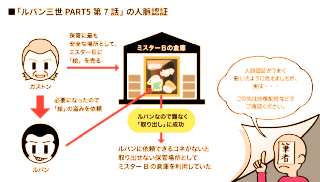
ルパン三世PART5 第7話の人脈認証

「ルパン三世」はどうやって認証を突破した?より

ITmedia NEWSの連載記事、架空世界で「認証」を知るの最新話、「ルパン三世」はどうやって認証を突破した? 他人をアテにする「人脈認証」を考える

まずは「ルパン三世PART5」の第6話「ルパン対天才金庫」からだ。

と言われて、「ルパン三世PART5」をまだひとつも観てないのを思い出した。

参照

ITmedia NEWS https://www.itmedia.co.jp/news/

Wikipedia http://ja.wikipedia.org/wiki/
パスワードの使い方

昨年伝えた「パスワードの定期的な変更」について。

Security baseline (DRAFT) for Windows 10 v1903 and Windows Server v1903でWindows 10の次期大型アップデート「Windows 10バージョン1903」(19H1)と「Windows Serverバージョン1903」においても「パスワードの定期的な変更を促していたポリシー」が廃止される模様。

何はともあれ、パスワードは使い回さないのが一番大事。

参照

ITmedia エンタープライズ https://www.itmedia.co.jp/enterprise/

Microsoft Security Guidance blog https://blogs.technet.microsoft.com/secguide/

国民のための情報セキュリティサイト http://www.soumu.go.jp/main_sosiki/joho_tsusin/security/

Wikipedia https://ja.wikipedia.org/wiki/

パスワードの使い方

日本経済新聞が「総務省が方針転換」と伝えた「パスワードの定期的な変更」について。

そもそもの発端となったのは2年前の米研究機関NISTのセキュリティガイドラインで行った「認証側がパスワードの定期的な変更を要求すべきではない」という趣旨の発表に基づくものであり、国民のための情報セキュリティサイトでも2017年11月からは「定期的な変更は不要」という文言を掲載していたという事なので、何を今さらという感じ。

要は「過度な負担を強いるパスワード管理」では「忘れるのが怖くなって簡単なパスワードにしてしまう」とか「いくつも覚えられないので使い回してしまう」というリスクの方が大きいので、「ある程度強力なパスワードを使い分ける」のがセオリーという事だ。

参照

日本経済新聞 https://www.nikkei.com/

ねとらぼ https://nlab.itmedia.co.jp/nl/

ITmedia NEWS https://www.itmedia.co.jp/news/

国民のための情報セキュリティサイト http://www.soumu.go.jp/main_sosiki/joho_tsusin/security/

Wikipedia https://ja.wikipedia.org/wiki/

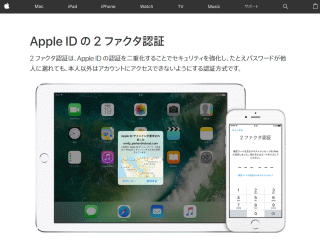
Apple IDの2ファクタ認証

2ファクタ認証は、Apple ID の認証を二重化することでセキュリティを強化し、たとえパスワードが他人に漏れても、本人以外はアカウントにアクセスできないようにする認証方式です。

Apple ID の 2ファクタ認証より

昨日、

Thank you for using two-step verification to protect the security of your Apple ID. If you install the iOS 11 or macOS High Sierra public betas this summer and meet the basic requirements, your Apple ID will be automatically updated to use two-factor authentication. This is our most advanced, easy-to-use account security, and it’s required to use some of the latest features of iOS, macOS, and iCloud. Once updated, you’ll get the same extra layer of security you enjoy with two-step verification today, but with an even better user experience. Verification codes will be displayed on your trusted devices automatically whenever you sign in, and you will no longer need to keep a printed recovery key to make sure you can reset a forgotten password.