tinytuyaとtuyapi
消費電力が確認できるGosundスマートプラグの続報。
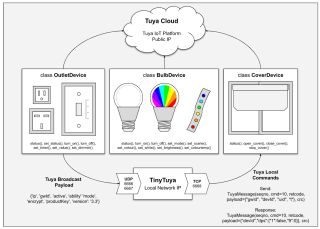 |
| jasonacox/tinytuyaより |
デバイスID'18261828c4dd57XXXXXX'とローカルキー'7e5f08badbYYYYYY'が取得できたので、クラウドではなくLAN経由に対応している(らしい)tinytuyaにトライ。
まずはpython3とtinytuyaをインストールし、"tinytuya scan"でスマートプラグのIPアドレスを調査。
yano@haswell:~$ sudo apt install python3 python3-pip"tuyapower"だとこんな感じ。
yano@haswell:~$ python3 -m pip install tinytuya
yano@haswell:~$ python3 -m tinytuya scan
TinyTuya (Tuya device scanner) [1.7.2]
Scanning on UDP ports 6666 and 6667 for devices (15 retries)...
Unknown v3.3 Device Product ID = keyneruwsdethu7u [Valid payload]:
Address = 172.16.NN.MM, Device ID = 1826182870039fXXXXXX, Local Key = , Version = 3.3, MAC =
No Stats for 172.16.NN.MM: DEVICE KEY required to poll for status
Unknown v3.3 Device Product ID = keyneruwsdethu7u [Valid payload]:
Address = 172.16.NN.MM, Device ID = 18261828c4dd57XXXXXX, Local Key = , Version = 3.3, MAC =
No Stats for 172.16.NN.MM: DEVICE KEY required to poll for status
Scan Complete! Found 2 devices.
>> Saving device snapshot data to snapshot.json
yano@haswell:~$
yano@haswell:~$ python3 -m pip install tuyapowerプラグが複数ある場合はデバイスIDで識別可能だ。
yano@haswell:~$ python3 -m tuyapower
TuyaPower (Tuya compatible smart plug scanner) [0.2.0] tinytuya [1.7.2]
Scanning on UDP ports 6666 and 6667 for devices (15 retries)...
FOUND Device [Valid payload]: 172.16.NN.MM
ID = 1826182870039fXXXXXX, product = keyneruwsdethu7u, Version = 3.3
Device Key required to poll for stats
FOUND Device [Valid payload]: 172.16.NN.MM
ID = 18261828c4dd57XXXXXX, product = keyneruwsdethu7u, Version = 3.3
Device Key required to poll for stats
Scan Complete! Found 2 devices.
yano@haswell:~$